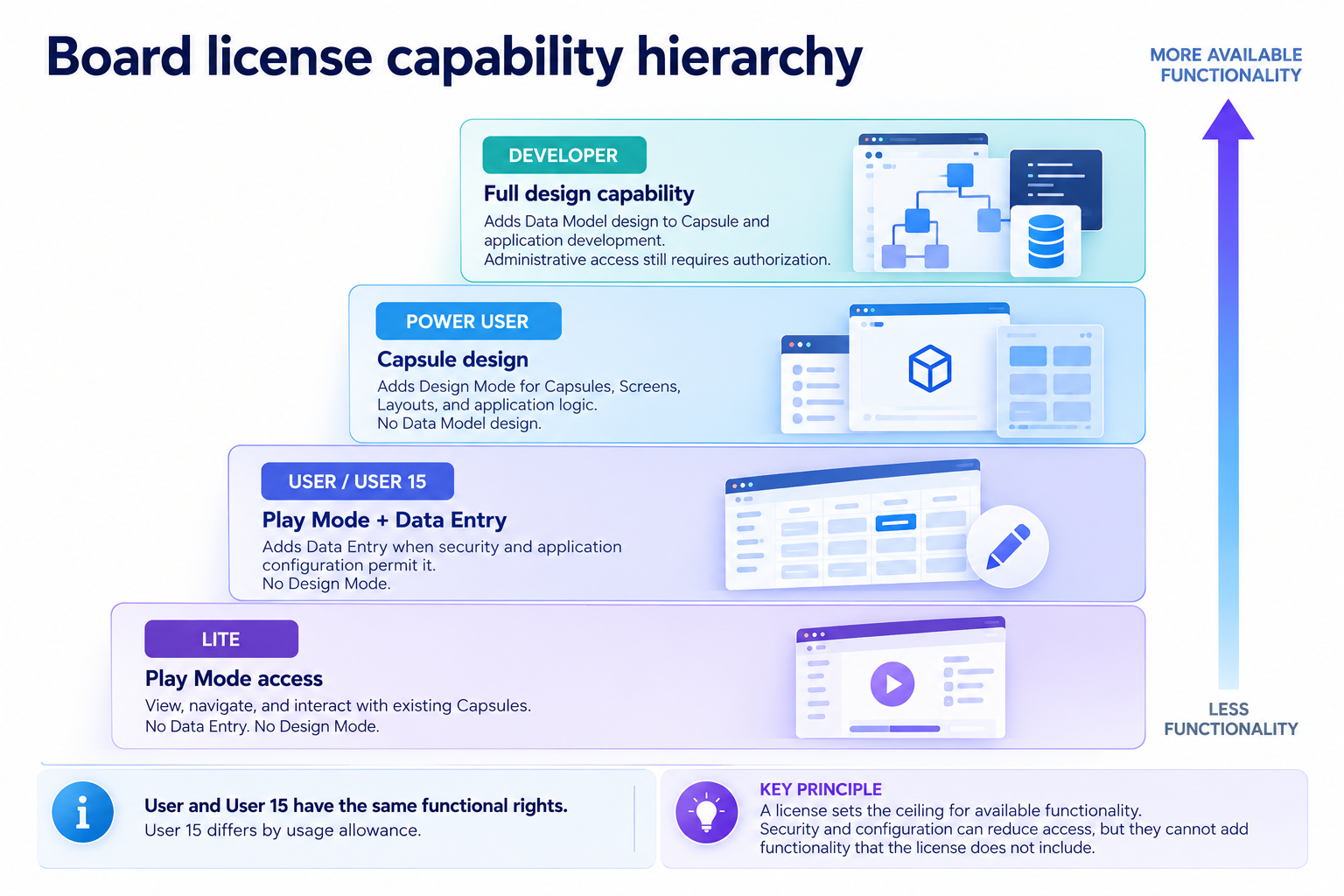
A license defines the maximum functionality available to a user. The user’s actual access also depends on the combination of license + persona + security configuration.
Persona describes the user’s role and use case.
License defines the maximum functionality available.
Permissions and application configuration determine what the user can actually access.
Board license hierarchy
Each level shows the maximum product functionality that the license can provide.
Board personas to licenses
There are four personas used in the knowledge base to explain features and permissions within Board. These personas can have different licenses and sometimes the same licenses. They can also have further security or role restrictions.
Board Personas describe how users typically interact with Board, not what they are technically allowed to do.
Board Licenses define the maximum functionality available, while Roles, Application Profiles, Data Model Security, Folder security, and application configuration determine what each user can access.
The four Board personas are:
Administrators manage users, platform configuration, and security in the Administration section.
Developers build and maintain Data Models and Capsules.
Planners/end users plan applications and perform analysis or data entry. A Planner or end user primarily works with existing Board applications in Play Mode.
Planner and end user are different personas, but they often perform similar tasks in Play Mode. For this reason, the knowledge base sometimes uses the combined term Planner/end user or terms interchangeably. Using one or the other term does not mean that every user with the same persona has the same responsibilities, license, or permissions.
End users access and consume data from a Capsule in Play Mode only. They can perform data entry unless data entry is restricted or they have a Lite license. An end user can be further restricted to a “Viewer”, a user with read-only access.
Viewer is not a separate persona. It describes a user with read-only access, typically through a Lite license or additional restrictions on another license.
Why does the persona Planner/end user have two names?
Planner and end user are distinct personas, but the knowledge base uses these terms interchangeably when describing similar Play Mode activities. Articles may state that Planners or end users can perform an action when the guidance applies to both personas. A Planner is typically associated with a Power User license and has a use case that includes Data Entry. An end user may perform many of the same Play Mode activities, but Data Entry isn't always guaranteed and may be restricted.
A Power User license supports both Design Mode and Play Mode. When the knowledge base describes a Power User working in Design Mode, it refers to that user as a Developer. When it describes the same Power User working in Play Mode, it refers to the user as a Planner or end user.
The license remains the same; the persona name depends on the activity described.
Personas don’t always have the same license, and therefore doesn’t guarantee all the same permissions and access. In the knowledge base, features are documented without considering license, permissions, or restrictions. As we continue to refine Board personas, licenses, and related functionality, we may standardize this terminology in the future.
For more details, see About Board personas.
Personas to licenses and activity in Board chart
The following chart shows common persona and license combinations, with notes about typical access and restrictions. These combinations are examples, not permission rules. Actual access depends on the assigned license and security configuration.
A Power User can use Capsules in both Design Mode and Play Mode. The same user may therefore appear in more than one row. The examples below describe typical use cases, not fixed permission rules.
Persona | Typical activity/area of Board | Typical license for this activity | Notes |
|---|---|---|---|
Administrator | Administration | Developer | An Administrator manages Platform-level settings and access in the Administration section. A Developer license supports administration and Data Model/Capsule development functions, but Roles, Application Profiles, and other security settings can restrict access. |
Developer | Data Models and Design Mode in Capsules | Developer | A Developer builds Data Models and designs Capsules. A Developer license supports Data Model design, Capsule development, and access to the Administration section, but permissions and access can be restricted based on their business role. Just like a Developer license can be restricted to only the Administration section, a Developer license can also be restricted to only Data Model management or Capsule design. |
Developer | Capsules in Design Mode | Power User | A Power User license supports Capsule development like a Developer persona and Play Mode interaction like a Planner persona, but does not provide access to Data Model design or Administration areas. Permissions can always be further restricted. |
Planner/end user | Capsules in Play Mode, using data entry | Power User | A Power User license supports Play Mode interaction like a User license but still has the permission to use Design Mode. These permissions can be further restricted. |
End user or Viewer | Capsules in Play Mode only, data entry optional or restricted | User, User 15, or Lite* | A User or User15 license can only interact with Capsules in Play Mode. They cannot alter anything saved, however, they can save a Screen configuration as a My View, which will not apply to any other users. If they want to save a certain configuration from a Screen, they may have the options to export the Object or save it as a Presentation. |
How Board access is restricted
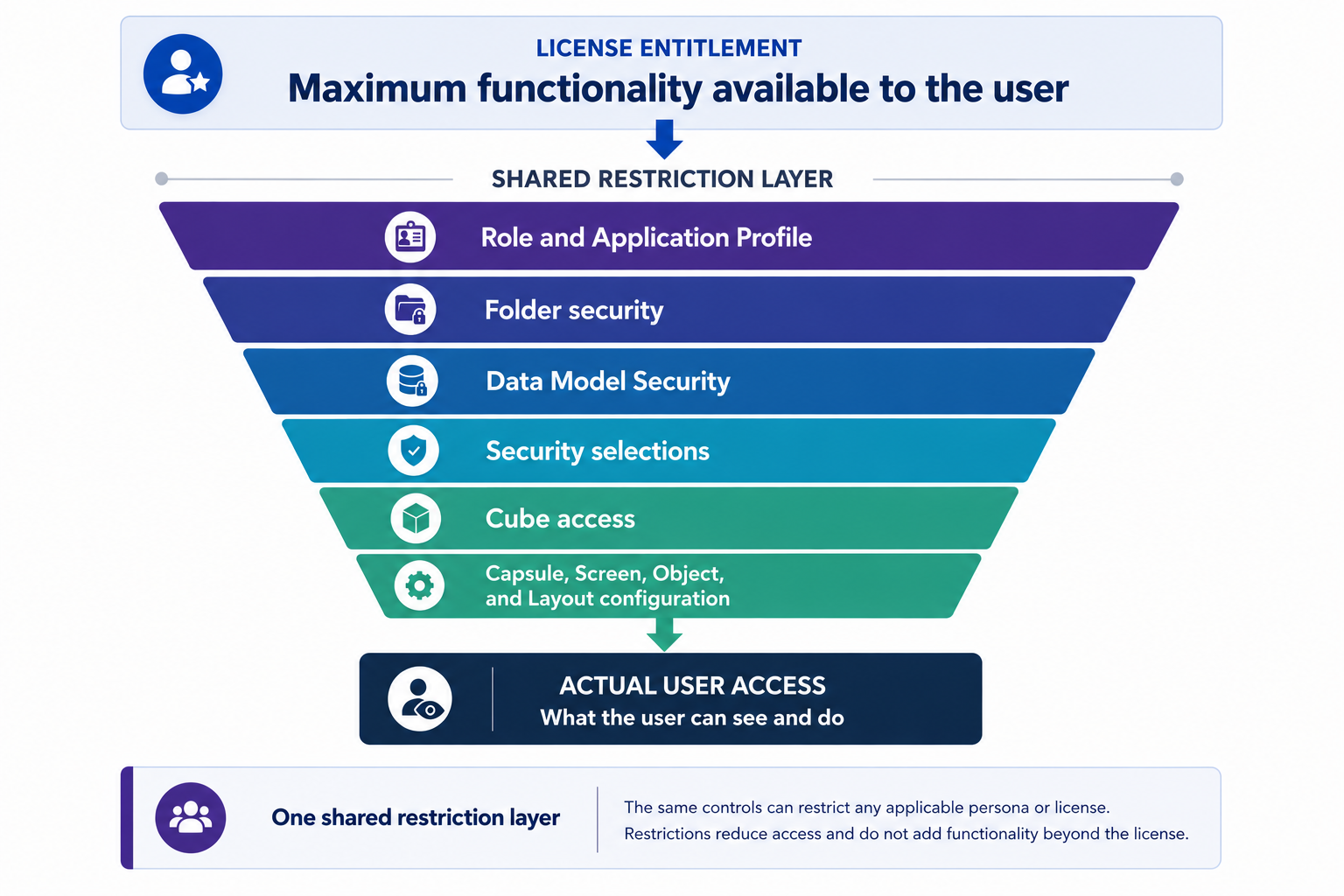
A license sets the maximum available functionality. Security and application settings can restrict functionality and access.
Troubleshooting access/restriction issues
Additional restrictions table
If you cannot perform an action that your license type normally supports, your access may be restricted by your Role, Application Profile, Data Model Security, Folder security, Cube access, security selections, or the configuration of the Capsule, Screen, Object, or Layout. Check your assigned license and permissions in the User profile panel, or contact your Board administrator.
Restriction | What it can restrict | Example |
|---|---|---|
Platform functions and application features | Prevent access to the Selection editor, Layout Editor, Procedures, exports, or other functions | |
Capsule folders and Capsules | Prevent a user from opening a specific Capsule | |
Data Models, Cubes, Entities, and write access | Allow a user to view a Cube but prevent Data Entry | |
Data visible to the user | Limit a user to specific Entity members, such as one region | |
Read or write access to specific Cubes | Make a Cube read-only even when the license supports Data Entry | |
Application configuration | Available interactions in a Capsule, Screen, Object, or Layout | Remove Data Entry or prevent access to a Selection interaction |
Examples
License entitlement | Additional restriction | Actual result |
|---|---|---|
User supports Data Entry | Cube is read-only | User cannot perform Data Entry |
User supports Selection interactions | Application Profile denies the Selection editor | User cannot open the Selection editor |
Developer supports Data Model design | Data Model Security restricts the Data Model | Developer cannot access the restricted Data Model |
Any applicable license supports Capsule access | Folder security denies access | User cannot open that Capsule |
How to interpret access problems
A license defines the maximum functionality that is available to a user, but it does not guarantee access to every function, area, or interaction in Board. If a user cannot perform an action that their license type normally supports, access may be restricted by their Role, Application Profile, Data Model Security, Folder security, Cube access, security selections, or the configuration of the Capsule, Screen, Object, or Layout.
For this reason, check the user’s assigned license together with the relevant security and application settings. If the user’s exact permissions are unknown, the user may have one or more additional restrictions that prevent the action, even when the assigned license supports it.
Task or capability | Minimum license or license feature | Additional access checks | If unavailable |
|---|---|---|---|
Data Entry | User, User 15, Power User, or Developer. Lite licenses do not support Data Entry. | Check Data Model Security, Cube access, security selections, and the Capsule, Screen, Object, or Layout configuration. | The user may have read-only Cube access, restricted data access, or a configuration that prevents Data Entry. |
Design Mode in Capsules | Power User or Developer | Check the user’s Role, Application Profile, Folder security, and Capsule permissions. | The user may have a license that supports Design Mode, but their permissions may restrict Capsule design or access to the selected Capsule. |
Data Model design | Developer | Check Data Model Security and administrative permissions. | The user may have a Developer license but still be restricted from accessing or modifying a specific Data Model. |
Administration | Developer | Check the user’s administrative authorization, Role, and Subscription Hub permissions. | The user may have a Developer license but not the required authorization to access or manage administrative areas. |
Board for M365 Add-ins | Included with Developer and Power User licenses. For other licenses, check whether the M365 Add-ins license feature is enabled for the user. | Check the user profile in the Subscription Hub and any Application Profile settings for the M365 Add-in workspace. | The user may need the M365 Add-ins license feature enabled, or an Application Profile may restrict specific Add-in functions. |
GenAI / Board AI Agents | Included with Developer and Power User licenses. For User and Lite licenses, check whether GenAI is enabled for the user. | Check the GenAI setting in the user profile, the Board AI Agents subscription status, available instances, and API Credits. | The user may not have GenAI enabled, the feature may not be active for the subscription or instance, or API Credits may be exhausted. |
Foresight | Developer or Power User with Foresight enabled. | Check the Foresight setting in the user profile and whether the feature is active for the subscription. | The user may have an eligible license but still need Foresight enabled in their user profile. |
Operational Forecasting | Developer or Power User with Foresight and Operational Forecasting enabled. | Check that Foresight is enabled first, then check the Operational Forecasting setting in the user profile. | The user may be missing Foresight access, Operational Forecasting access, or an eligible Developer or Power User license. |