A license defines the maximum functionality that can be available to a user. Other permissions and security settings can further restrict what the user can access.
Example
A User license supports Data Entry, however, Data Model Security, Cube permissions, or the configuration of a Capsule can prevent a user from entering data everywhere or in certain Capsules.
Available Board license types
The five license types provide different levels of functionality and usage rights. They are listed below from the license with the most capabilities and access to the license with the most restricted functionality.
Developer. Provides the highest level of product access. It is typically used for Administrator or Developer personas.
A Developer license allows users to create and modify Data Models and Capsules. A Developer license is required for Data Model design.
Administration access requires both a suitable license and administrative authorization. A Developer license is required for access to System Administration, but the license alone does not grant access. The user must also have the appropriate Role and administrative permissions. Subscription Hub administration is controlled separately through Subscription Hub authorization and is not determined solely by the user’s Board license.
Board for M365 Add-ins are included with this license.
Access to administrative functions requires additional administrative authorization.Power User. Allows users to create and modify Capsules in Design Mode and perform planning activities, including Data Entry, and analyze data in Play Mode. Data Entry and other functions remain subject to permissions and application configuration.
Power User licenses do not provide access to Data Model design capabilities, although the Entity Editor Object allows Entities to be made and added to a Cube within a Data Model.
Board for M365 Add-ins are included with this license.User. Allows users to open and interact with existing Capsules in Play Mode. Any changes to an Object can only be saved in a Presentation and not to the Screen. A User license does not allow users to create or modify Capsules.
The User license supports functions used in planning applications, including Data Entry, when the required permissions and application configuration allow them. Data Entry, certain selections, Layout Editor capabilities, and data access can be restricted.User 15. This license provides the same functions as the User license but is limited to 15 days of use over a subscription’s calendar year. Read the conditions and limitations for the User15 license in the paragraph below.
Lite. Provides the same general Capsule navigation functions as a User license but does not allow Data Entry.
User 15 license count calculation
The User 15 license is not a permanent seat license. Instead, it is calculated based on active usage days.
Each assigned User 15 license allows a user to access Board for up to 15 active days within the subscription period.
The days are calculated by multiplying 15 days by the number of purchased User 15 licenses.
For example, if 10 User 15 licenses have been purchased, the subscription includes a total of 150 days (10×15) of use per calendar year.
An “active day” is counted when the user logs in and accesses the platform.
No day is deducted for any subsequent logins by the same user on the same day.
Days are consumed only when the user is active; inactive days are not deducted.
User 15 licenses can be reassigned freely, however, once the 15-day allowance is exhausted, the license does not give any user access to Board unless additional usage days are assigned or the license is upgraded.
This applies even if some assigned users have not individually used all 15 days.
This means that user A can use the license for 10 days and if it is then reassigned to user B, user B only has 5 days to use the license.
This model is typically used for occasional or seasonal users who do not require continuous access.
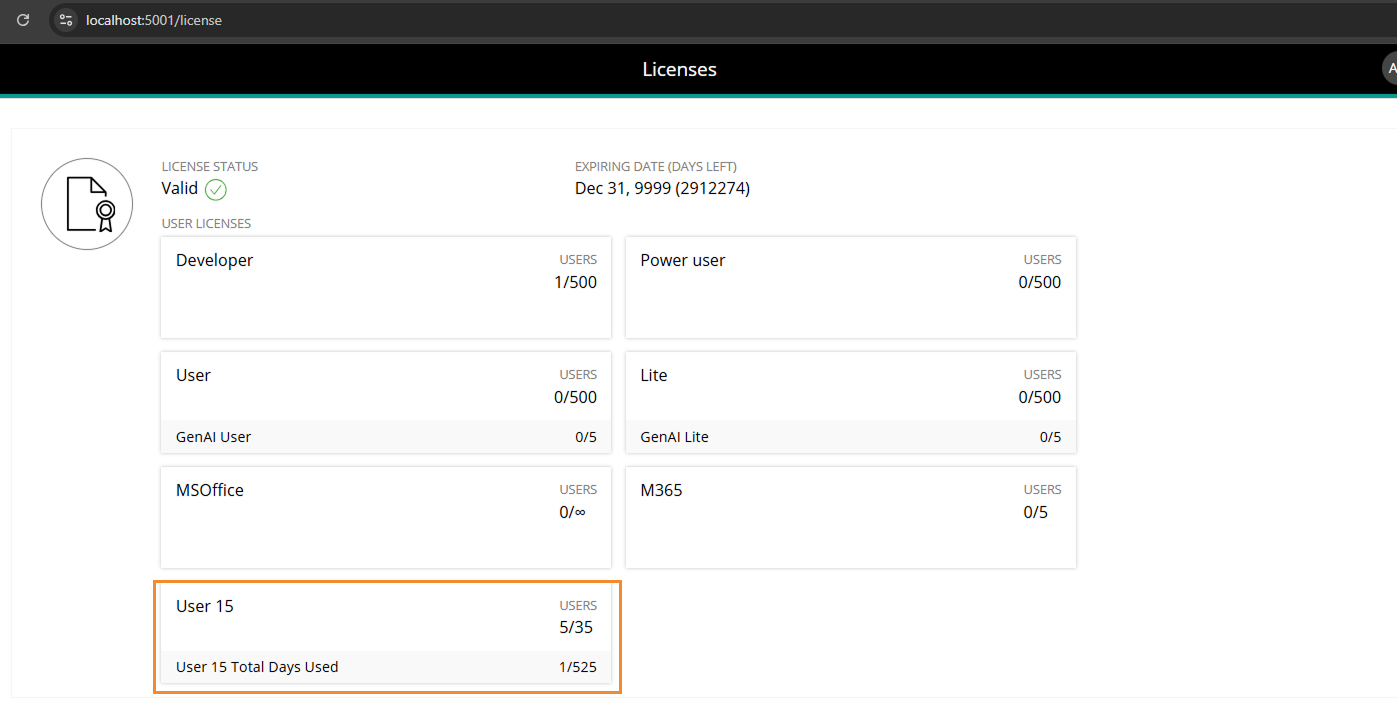
In the Licenses section, the User 15 license tile shows:
Users. The number of currently active users assigned a User 15 license over the total number of purchased User 15 licenses. Disabled users are not included in this count.
The total number of days used. This total includes days consumed by users who have since been disabled.
Licenses and permissions
A license alone does not determine access.
Board applies multiple layers of security after license assignment. These layers can restrict or refine what a user can see or do, even if the license technically allows the feature.
Key control layers include:
Roles and Platform authorization. define user permissions at platform level
Application Profiles. restrict features such as Layout Editor, Selection editor, exports, or Procedures
Folder security. controls access to Capsules and folders
Data Model Security. controls access to data, Cubes, and Data Model design
Security selections. restrict visible Entity members and data scope
Application design (Capsules, Screens, Objects, Layouts). defines available interactions
These controls always operate within the limits of the assigned license. A higher license does not override security restrictions.
License Add-ons
In addition to user licenses, Board subscriptions may include licensed add-ons that extend platform capabilities. These add-ons are not tied to a specific persona but instead enhance functionality across all or selected users.
Common add-ons may include (depending on subscription):
Board MS Office Add-in
Board for Microsoft 365 Add-in
Only supported by 15.x versions.
AI Agents
Foresight
Operational Forecasting
Add-ons are applied at the platform level and can affect all users, but access may still be controlled through Roles and Application Profiles.
MS Office and M365 Add-in license add-ons
Board for M365 Add-ins are the newer Microsoft Add-ins that are only compatible with Board version 15 or newer which have the Subscription Hub. The M365 Add-ins license add-on also includes access to the MS Office Add-in. In the user profile, you can enable “Office,” “M365 Add-ins,” or both, depending on the access required. M365 Add-ins are included with Developer and Power User licenses. For all other licenses, the M365 Add-in license must be added and then configured in the specific user’s profile under “Licenses”.
Access to use M365 Add-ins includes permission to use the MS-Office Add-ins. If you currently have an MS-Office license, you may be eligible to upgrade to the M365 Add-in license while retaining access to both. Consult your Account Manager for more information.
Foresight and Operational Forecasting license add-ons
Foresight access is managed in the Subscription Hub on a per-user basis. Enable the Foresight option in the user's profile to grant access to the Foresight application.
Operational Forecasting requires Foresight access and is available only to users with an eligible Developer or Power User license. To grant access, first enable Foresight for the user, then enable Operational Forecasting in the user's profile.
Operational Forecasting does not have a separate license limit in the Subscription Hub. Access is determined by the number of available Developer and Power User licenses in the subscription.
Access granted through the Subscription Hub applies across all environments associated with the subscription.
Board AI Agents
Board AI Agents are only compatible with Board version 15 or newer which are Cloud-based and have the Subscription Hub. Read more about Getting started with Board AI Agents.