Users can export a Flex Grid configuration from the Platform to a compatible Excel file to use in the Board M365 Excel Add-in. The export maintains graphical formatting, selections, grid-made filters and sorts, and grouping.
This feature enables seamless workflow in Excel by reducing manual, ungoverned exports and unifying the Flex Grid with Excel Add-in experience to ensure consistent, governed access to Board data across both environments.
Export to Board for Microsoft 365 Excel Add-in is not supported for Data View Objects
How to export a Flex Grid to Board M365 Add-in
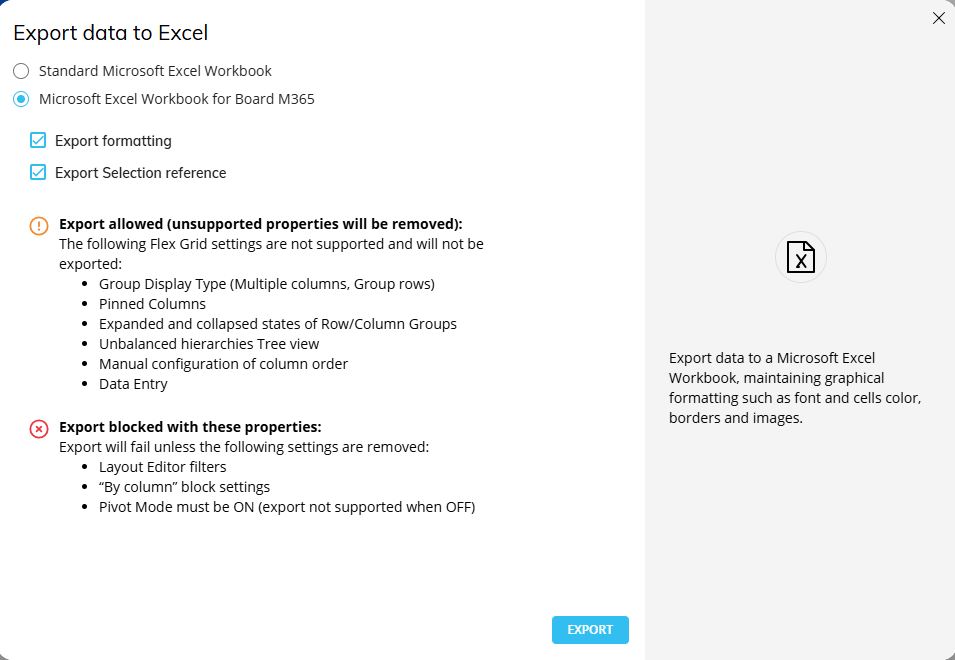
Click on “Export to Excel” from the Object Toolbar of a Flex Grid or from the right click menu.
Export from Screen to Excel M365 Excel Add-in is not yet supported.
Choose the option “Microsoft Excel Workbook for Board M365”
Choose the following options to facilitate the export:
Export formatting. Exports Flex Grid with configured formatting. Enabled by default. If disabled, formatting is ignored.
Export Selection reference. Keeps the configured selections. If disabled, selections are ignored.
Click “EXPORT”.
Sorts and filters in export
Filters made in the Filter panel of a Flex Grid are kept in the export. Each active filter becomes a filter rule in the right task panel.
Sorting on fields are kept and the “Multi-sorting” order applies.
Filters and sorts applied on columns are not supported.
Filter and sorts are combined into one rule.
Limitations
Not all properties and setups specific to a Flex Grid Object are supported in the export.
The following Flex Grid options are not supported in Board M365 Add-in:
Export Flatten is not available for exports specific to the Add-in.
Group Display Type is not supported.
Pinned Columns are not supported.
Expand configuration is not reflected in the export. All groups appear collapsed by default.
Unbalanced structures are not supported.
Treeview does not expand unbalanced member is export.
Reordering of columns or groups is not supported in the export
Drills
Docked Charts
Vertical Aligned Layout is disabled at the export
Pinned Columns
Flat view
Data Entry
By Column configured
Layout filters
The following Flex Grid Object Properties are ignored when exported:
Desaturate color alert
Show fields panel
Show Filters panel
Show Pivot Mode
Allow changing column visibility
Allow Grouping by row
Allow Grouping by col
Allow aggregation of totals
Remove aggregation label
Show status bar
Suppress group count
Enable click on URL
Allow Vertical Block Alignment
Expansion level
GroupDisplayType
Sorting modification
Filtering modification
Data entry options
Rows Density