The Color Alert settings allow you to configure conditional formatting (alerts) on a Data Block. The formatting options will change the appearance of values in the selected Screen Object, based on the alert configuration.
The alert is defined by threshold values: the configuration settings show 3 color ranges by default (red, white, and green by default), but you can add as many ranges as you need. Colors can also be customized.
Default Color Alert configuration
In the default configuration, cells of a Block containing values less than the red alert threshold are colored red, while those with a value higher than the green alert threshold are colored green. Cells of a Block containing values greater than the red alert threshold and less than the green alert threshold are colored white.
Types of Color Alerts
The Color Alert can be set on manually entered threshold values or based on values of another Data Block in the Layout. In order for the Color Alert option to work, it must refer to numeric data (Cubes, algorithms, Ranking functions, Rules).
From the Block settings area in a Layout, you must enable the Color Alert toggle to turn Color alerts on. From the Color Alert panel, you can configure the thresholds, colors, and amount of alerts.
You can choose between the following four alert formats:
Figures (default). Conditional formatting is applied to the font color.
Blocks. Conditional formatting is applied to the cells background.
On total cells, Board applies the alert color to the cell value in the total cell. Board does not apply the alert color to the total cell background like other cells. The total cell keeps the standard total background.
Blocks only. Conditional formatting is applied to the cells background and values are hidden.
On total cells, Board applies the cell value and the alert color to the cell value in the total cell. Board does not apply the alert color to the total cell background like other cells. The total cell keeps the standard total background.
Smarties. Conditional formatting is applied to a small circle that appears to the left of values, in their very cells.
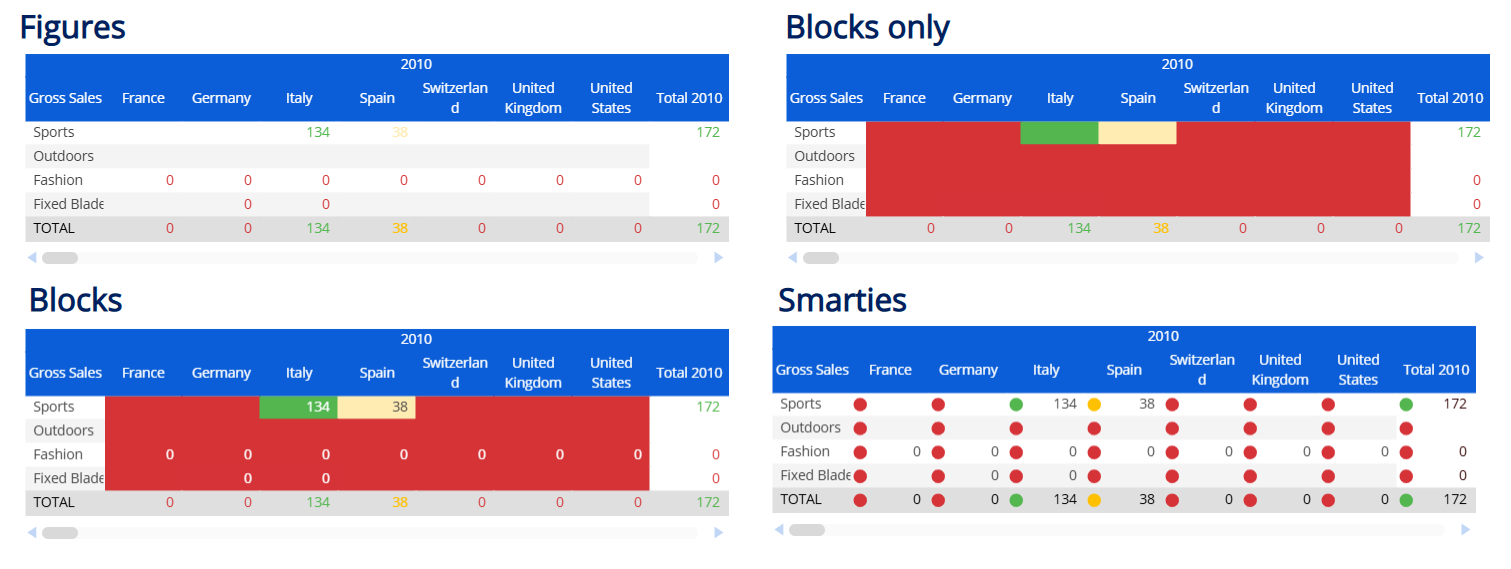
For Blocks and Blocks only, regular cells and total cells show Color Alerts in different ways.