A Dataset is a semantic layer of data that enhances self-service capabilities in the Board platform. It allows users to interact with data without needing to know in detail all the data structures of a Data Model.
This articles covers:
What is Datasets?
A Dataset is a semantic layer of data which can be created and configured by Developers, allowing users to interact with other Board Functionalities, namely Board AI Agents, the Board M365 Excel Add-in and Board Foresight, without needing to know in detail all the data structures of a Data Model.
On the other hand, datasets allows Developers to:
Create structured, purpose-built queries
Empower business users with self-service data exploration
Reuse existing Screen Layouts as datasets
Currently, Datasets are bound to the Board Engine and rely on internal queries.
Before creating a Dataset, ensure a Data Model with Cubes, Entities, and Data Readers exists.
The Dataset Catalog
In the Data Model area, a tile is available to manage Datasets.
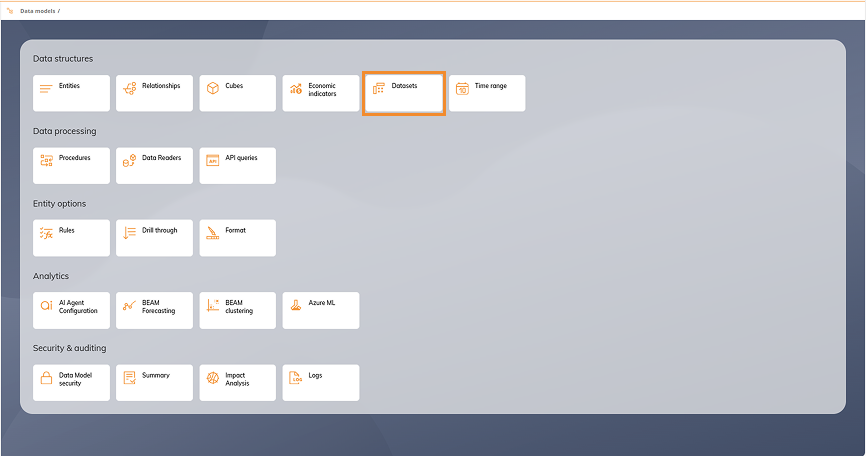
Click on this tile to access the Dataset Catalog, from where you can:
Select an existing Dataset to edit, duplicate or delete it
Search or filter the list of available Datasets

Dataset metadata
Each Dataset includes the following metadata:
Name. Name of the Dataset to be displayed in all other functionalities where Datasets is used.
Description. Developer-defined explanation of the Dataset.
Data Model. Identifies the associated Data Model.
Created by. Developer’s username in Board.
Last Update / Creation Date. Timestamps.
Dataset for AI. Enabled for Datasets used by Board AI Agents.
Known Limitation
The dependencies of Datasets are not visible within Impact Analysis.
Read more about how to create and configure a Dataset.