Time Functions allow you to quickly create analyses comparing year-on-year data, obtaining year-to-date data, forecasting data, calculating rolling totals, and more. Time Functions are commonly applied to Data Blocks containing numerical Cubes.
When executing a Layout with Time Functions configured, the Time Function is applied to the Time Entity by Row and, if that Entity is a custom Time Entity, its mask is used to determine when the year changes and when to reset the accumulator which is applied using the “Calendar” setting under the Time Functions area of the Block Settings. Read more about the Calendar setting for Time Functions, Calendar mask configurations, and Custom Time Entities.
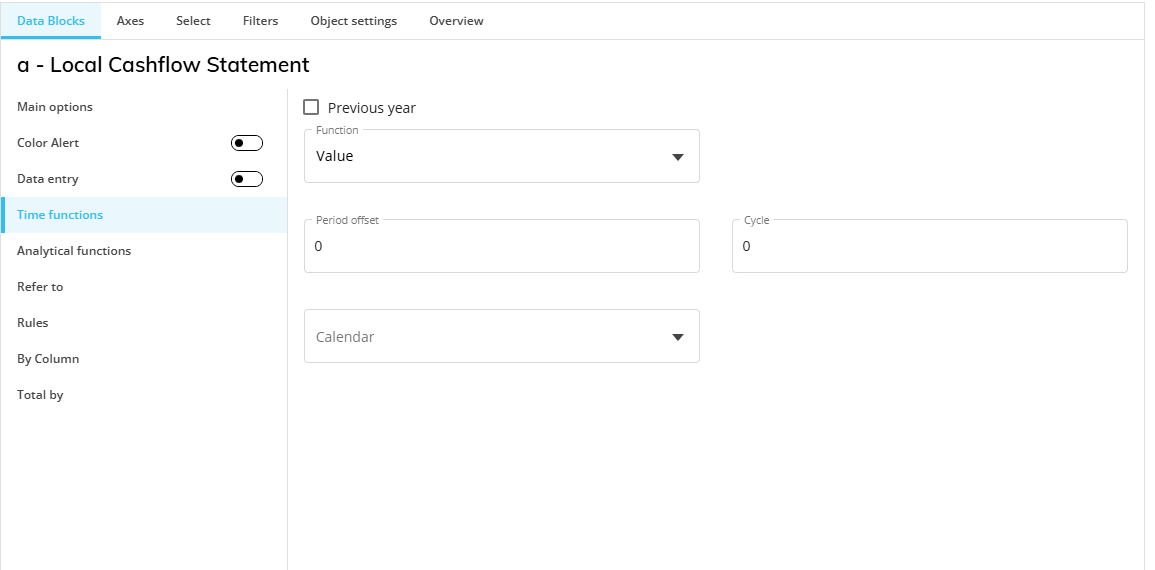
Time Function settings
The available Time Functions settings are the following:
Previous Year
When the Previous Year checkbox is ticked and no other function or option is active, it returns the previous year's data for the currently selected periods. For example, if the current Screen selection is May 2021 to July 2021, the previous year function will return data for May 2020 to July 2020.
Function
In the "Function" dropdown menu, choose one of the following Time Functions:
Value (default). Doesn’t apply any function.
Previous Period Value (PPV). Returns the data of the previous period, based on the currently selected period. For example, if the current selection is July 2021 and August 2021 on the Month Entity, it returns data for June 2021 and July 2021. If the current selection on the Week Entity is on week 15, the function returns data for week 14.
Previous Year Value (PYV). Works exactly like the "Previous Year" checkbox mentioned at the beginning of the list: it returns the previous year's data for the currently selected periods.
Yearly Cumulated Value (YCV). Returns the cumulated value from the start of the year up to the currently displayed or selected period. The start of the year is defined by the standard Year Entity or by the Fiscal year configuration, if the "Fiscal year" option is enabled. For example, when the function is applied to a Cube dimensioned by Month, it returns the cumulated value from January of the currently selected year. When it's applied to a Cube dimensioned by Day it returns the cumulated value from the first day of the currently selected year.
If the "Fiscal year" option is enabled in combination with YCV, the accumulation starts from the first period of the currently selected fiscal year. This option is available only if the fiscal year has been configured in the "Time range" section of the Board Data Model in use.
The Cycle field can be set in combination with the Yearly Cumulated Value (YCV) function. However, this is not required because YCV already includes an implicit accumulation period that starts at the beginning of the year and ends at the current period.
Fiscal year. Obtains the cumulated value from the first period of the currently selected fiscal year.
Yearly Moving Total (YMT). Returns the cumulated value over the course of the previous 12 months up to the currently selected period. This is a rolling yearly sum, so it changes at the end of each month by adding the new data from each new month to the total and subtracting the data from the first month of the period. For example, if the current selection is July 2021 on the Month Entity, the function returns the cumulated value from August 2020 to July 2021.
You can use the "Cycle" field to define the length of the rolling aggregation window.
By default, the Cycle refers to the Cube time dimension. For example, on a Cube dimensioned by Day, Cycle = 3 means 3 days.
When a Time Entity is set By Row or By Column, the Cycle is applied to that Time Entity instead. For example, if a Cube is dimensioned by Day and Month is set By Row, Cycle = 3 means 3 months.
Exception
If Year or Fiscal year is set By Row or By Column, the Cycle refers to the Cube time dimension, not to the Entity in the axis.
When Cycle = 0, Board interprets the value as 1 full year.
Yearly Moving Average (YMA). Returns the average period value over the course of the previous 12 months up to the currently selected period. For example, when applied to a Cube dimensioned by Month, this function returns the Yearly Moving Total value divided by 12.
You can use the "Cycle" field to define the length of the rolling average window.
By default, the Cycle refers to the Cube time dimension. For example, on a Cube dimensioned by Day, Cycle = 3 means 3 days.
When a Time Entity is set By Row or By Column, the Cycle is applied to that Time Entity instead. For example, if a Cube is dimensioned by Day and Month is set By Row, Cycle = 3 means 3 months.
Exception
If Year or Fiscal year is set By Row or By Column, the Cycle refers to the Cube time dimension, not to the Entity in the axis.
When Cycle = 0, Board interprets the value as 1 full year.
Last Value. Replicates the last non-zero value found in the time series into subsequent zero-valued cells until a new non-zero value is encountered, then the function replicates the new value into subsequent zero-valued cells. For example, if the Object displays data from July 2020 to July 2021 in a Layout by Month and there is only data up to December 2020, the function allocates the December 2020 value (the last value) to the remaining empty cells: January 2021, February 2021, March 2021, April 2021, May 2021, June 2021, and July 2021.
You can use the “Cycle” field to define how many periods are checked to find the last available value.
By default, the Cycle refers to the Cube time dimension. When a Time Entity is set By Row or By Column, the Cycle is applied to that Time Entity instead.
Exception
If Year or Fiscal year is set By Row or By Column, the Cycle refers to the Cube time dimension.
If there is no value in the range of periods considered, the result is 0.
When Cycle = 0, Board interprets the value as the entire time range.
Trend. Applies a linear function to the Cube and calculates predictive values of future periods (the prediction is represented with a straight line when plotted on a chart). The statistical model used to calculate the Trend function is based on a Moving Average model.
It is recommended to apply the Trend function to Cubes with at least 1 year of historical data. The Trend function can be combined with the "Ignore Current Period" option (checkbox) to exclude the last period of the current time selection from the dataset used to calculate the statistical functions.
Forecast. Applies a statistical forecasting function to the Cube and calculates predictive values of future periods. This function estimates the trend component and the seasonal component based on the historical data of the Cube to return a forecast that includes historical trends and seasonality.
Depending on the historical data series available, Board automatically selects the most appropriate statistical model from 3 options based on the exponential smoothing and moving average models, ARIMA models and the Winters models.The Forecast function can be combined with the "Ignore Current Period" option (checkbox) to exclude the last period of the current time selection from the dataset used to calculate the statistical functions.
Ignore Current Period. This option can be enabled when the Trend or Forecast statistical functions are used. It excludes the last period of the current time selection from the dataset used to calculate the statistical functions.
Period Offset
Period Offset is where the time selection is shifted by the specified number of periods.
For example, by setting Period offset to "-3" the function is applied to a time selection 3 periods before the currently selected one: depending on the Cube structure, it can be 3 months, 3 weeks, or 3 days. If you apply a Period offset of "-12" to a Cube dimensioned by Month, you'll get a result equivalent to the "Previous year" function.
The "Period offset" option cannot be used in conjunction with the "Previous year" option.
Cycle
Cycle is the number of periods to cumulate.
Cycle applies only to YMT, YMA, and Last Value.
Cycle considers the Cube time dimension by default. For example, if the Cube is dimensioned by Day, then Cycle=3 cumulates the last 3 days.
If a Time Entity By Row or By Column exists, then the Cube time dimension is ignored and the Time Entity By Row/By Column applies. For example, if Day dimensions a Cube and Quarter is set By Row, Cycle=3 cumulates the last 3 quarters.
Calendar
The Calendar is a property of Time Functions that you can configure to define a custom Time Entity to control when the accumulation period changes.
By default, time functions use Time Entities set by Row or defined in the Cube.
If you select a custom Time Entity from the Calendar dropdown in the Block settings, Board uses the Calendar Entity instead to:
Read the Custom Mask, if applicable. Custom Masks are used by Time functions that determine when the year changes. These functions are: YMT, YMA, and Last Value.
A Custom Mask is a string defined in the properties of a custom Time Entity. It identifies which part of each member code represents the year.
Determine when the year changes
Reset the accumulation
The Calendar applies at Block level, not at Layout level.
The Calendar overrides the Cube Time Entity when it is valid and applicable.
The Calendar Entity must be more aggregate than the Cube Time Entity.
If the Calendar is not more aggregate, the system ignores it.
The Custom Mask is required for all custom Time Entities.
Read more about custom Time Entities, Customs Masks, and the interaction between them.