Applies to: All Board Cloud subscriptions
The Client API section in Board allows you to configure secure access to Board APIs. It defines how external systems authenticate and interact with the platform, enabling controlled and secure API usage.
This article covers:
Learn more about Board APIs.
What is a Client API?
Client APIs act as the authentication layer for Board Public APIs, i.e., Client API does not define an API itself, but provides the authentication layer required to securely access Board Public APIs. It defines the credentials and permissions that external systems use to connect to Board.
For example, Client API users allow external systems to interact with Board by:
retrieving data such as Entities, Cubes, Relationships, and Entity members in JSON format
executing a Layout and Procedures
searching for a Capsule
performing a full text search.
Create a Client API when you need to allow an external system to securely access Board APIs.
Client API users cannot be imported via CSV file. They can be manually imported from a Board platform after you have associated it with the Subscription Hub.
How Client APIs are used
Client APIs act as the authentication layer for Board Public APIs. External systems use the credentials defined in a Client API to generate access tokens, which are then included in API requests.
A typical workflow is:
Create a Client API
Generate an access token
Call a Board Public API endpoint using the token
Receive data in JSON format or execute operations.
Configure a Client API
Before configuring a Client API, ensure that the required API functionality is available and that you have the necessary permissions to create and manage API configurations.
To configure the Client API:.png)
Click on "CLIENT API" and fill in all required fields, marked with a *: Client ID, the New client secret and the Confirm client secret fields.
The Client ID and the Client secret are essentially a username and a password that the external client will use to obtain an access token from the Subscription Hub. The request must comply with the OAuth2 client credentials flow specifications.
Once that token has been provided, it needs to be included in the API requests' header to access Board's resources.Tokens are valid for 8400 minutes (140 hours) from creation and will expire automatically after that time. If a Client API user is deleted, any API token created by that user account is deprovisioned at the same time. If a Client API user is only disabled, any API token created by that user account will continue to be valid until its expiration, but it is not possible to create a new token until the user is enabled again.
Choose the appropriate "Culture" option to apply a specific date and time format to API responses. Leave it blank to apply the default date and time format.
From the License dropdown menu, select the License type you would like to assign to the client API, just as you would do when adding a new user account.
The available License types may vary, depending on your Cloud Subscription. See the Licences section.
When the "Disabled" checkbox is ticked, the external client is not able to make API requests using the configured credentials and its license is available to assign to other user accounts.
Set a token expiration time for the API client, if applicable.
The limit is 259,200 minutes (180 days) and must be specified in minutes.
If you are creating the Client API to be used with Board's SCIM API service, tick the "Enable SCIM endpoint" option.
If you are creating the Client API to be used with Board's Audit Log API service, tick the "Enable Audit API endpoint" option.
In the Platform authorization table, select a Role, assign a License type and, if applicable, tick the "Admin" checkbox. if checked, the external client will be able to launch business critical procedures, as per your Board platform configuration. You will need to set those attributes for each listed Board platform that the external client should be able to access.
For more about the Platform authorization table, see the Users section.Set API permissions by ticking the desired checkboxes. You will need to do this for each listed Board platform that the external client requests access to (see the Board Public APIs section for more information).
Click "SAVE" to create the system user and start using Board's public APIs.
To learn more about the available APIs, see Board Public APIs and SCIM API Overview.
Authentication
Client APIs use OAuth2 to authenticate external systems. External applications use the Client API credentials to request an access token, which must be included in API requests as a Bearer token.
For more details on authentication, see the Client API configuration and Board Public APIs.
Token behavior
Access tokens are time-limited and must be renewed periodically. Their validity and lifecycle depend on the configuration defined in the Client API. External systems must handle token expiration and request new tokens when needed.
Client APIs overview
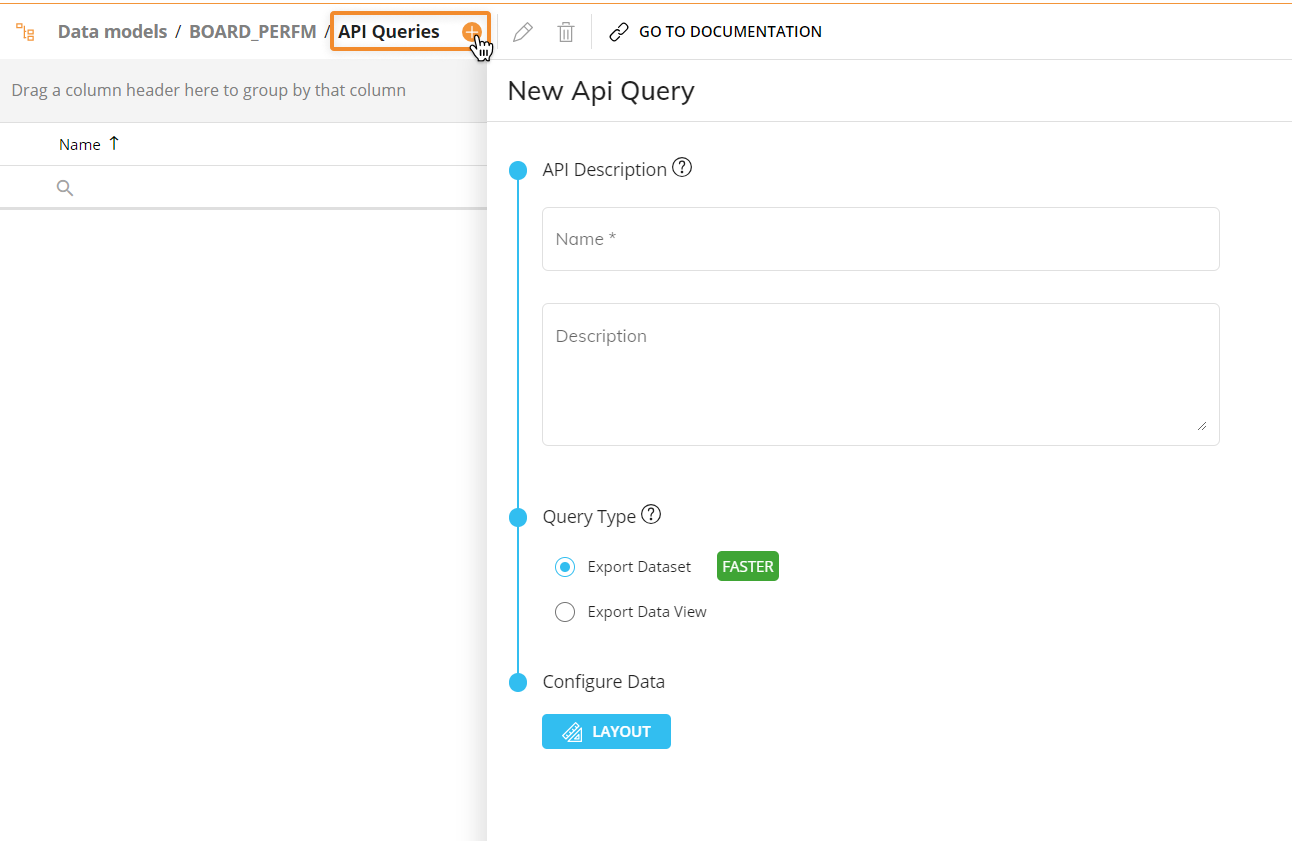
The API Queries must be configured in all Board platforms, under the "API Queries" section of each Data Model that you want the APIs to work with.
Once you've created the necessary Client API user, an authorization token must be generated before making any request.
The token returned from this request must be used to manage the authentication in the API requests.
The authentication must comply with OAuth2 client credentials flow specifications.
To obtain the authorization token, set the following additional parameters:
Grant Type: "Client Credentials"
Access Token URL: https://your-subscription-hub-url/connect/token
Scope: "public-api"
Client Authentication: "Send client credentials in body"
Client API users don't consume any Board license, but Roles applied in the "Platform authorization" table are always respected.
ApiQuery requests limits
ApiQuery requests are free up to 500 requests per day and 10 requests per second. This limit can be increased with an additional license. If you need an increase to your quota, contact your Board Customer Success Manager or Key Account Manager.
Note that custom quotas are only available for Cloud subscriptions. Quotas are unnecessary when using an On-Premises installation of Board.
API authorization in Swagger
You can perform an API Client authorization in the Swagger interface, which allows you to test Board public API queries directly from Swagger. The authentication supports only the OAuth2 client credentials flow.
To authenticate in Swagger:
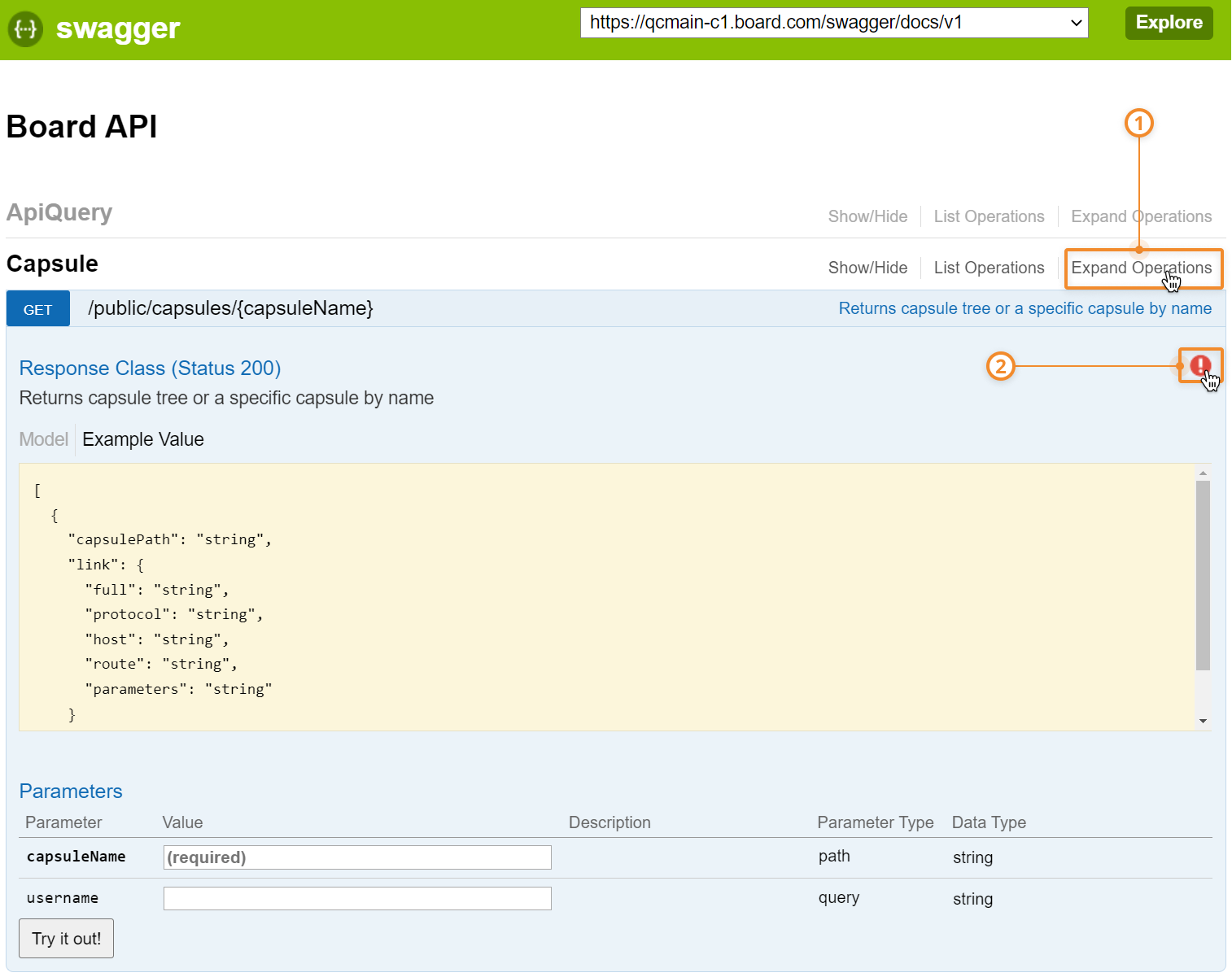
From the Board public API documentation page in Swagger, click on the "Expand operations" of the desired public API endpoint and then click on the red circular button with the exclamation point to open the authorization pop-up window.
You can access the API documentation page from the API queries page of the desired Data Model.
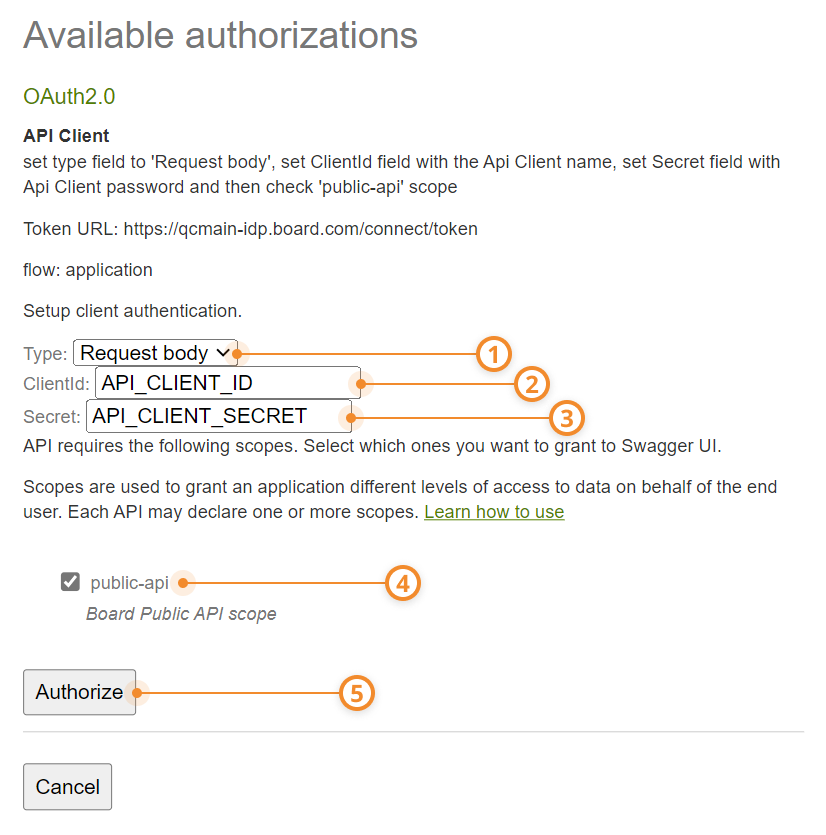
Select "Request body" from the type field.
Enter the Client ID of the required Client API in the "ClientId" field.
Enter the Client Secret of the required Client API in the "Secret" field.
Enable the "public-api" scope option.
Click on "Authorize" to authenticate. The red button with the exclamation point turns blue after a successful authentication. Once authenticated, you can make API queries directly from the Swagger page.