Board AI Agents interpret data, suggest actions, and guide workflows in collaboration with the user. They provide insights and recommendations while ensuring the user always retains full control.
This section cover the following topics:
The Board AI Agents require an internet connection, a Board license associated with the Board 15 cloud with Subscription Hub version, administration permission from the Subscription Hub for User and Lite licenses, and other system requirements listed below.
Board license requirements
Users must be given permission via the User section of the Subscription Hub. The "GenAI" feature is available for Developer, Power User, User, and Lite licenses. Developer and Power User licenses are enabled by default. User and Lite licenses must be enabled in the "User" section of Subscription Hub.
To enable Board AI Agents :
Go to System Administration and click on the Subscription Hub tile
Go to the User section
 and select the user to view their user profile
Navigate to the License section of the user profile and enable the checkbox labeled “GenAI”
You call also enable the “GenAI” checkbox for user permissions
 .
When exporting users, the “GenAI” checkbox is included in the exported file.
Other Subscription Hub sections
In the AI Platform Activation section  , you can check the “STATUS” of your License and the number of “INSTANCES USED” compared to the maximum allowed. A table below displays the instances where the Board AI Agents feature is available. From this table you can determine which instances can access the Board AI Agents feature.

In the Licenses section  , you can see the number of licenses in use. All Board AI Agents are also listed here as any user with GenAI permissions has access to all Agent types.
AI usage and API Credits
Board AI Agent usage is measured with API Credits. API Credits are managed at tenant level.
The monthly effective API credit limits includes the tenant’s monthly base allotment and any pack contributions available during the current usage cycle (including production and sandbox instances) which always resets on the 1st of the month. Board calculates the allowance in the tenant’s cycle time zone.
The API Credits are monitored in the Subscription Hub for administrators, however, users are provided alerts and notifications when their usage reaches 80%, 90%, and 100%.
API Credits reset monthly and cannot be carried forward.
AI usage alert notifications and hard stops
All users in-app notifications
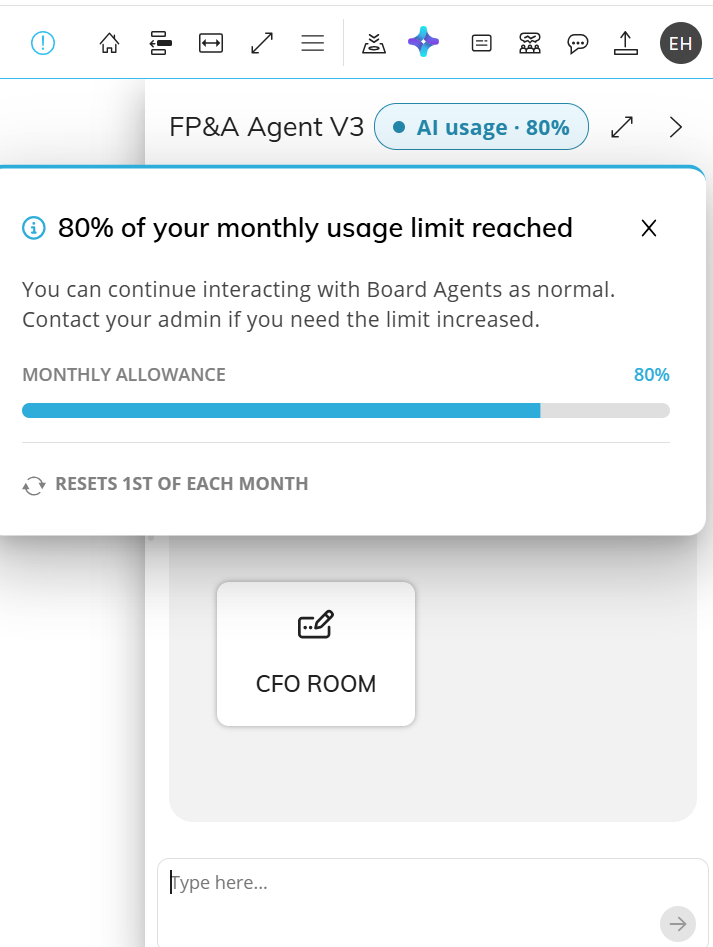
Users are provided alerts and notifications within the Agent panel when their usage reaches 80%, 90%, and 100%.
When monthly consumption reaches:
80% of the effective allowance end users see a blue in-chat notification badge at the top of the chat and a pop-up alert that shows the current consumption and allowance.
90% of the effective allowance, end users see an orange in-chat notification badge at the top of the chat and a pop-up alert that shows the current consumption and allowance.
[90 image]
100%, Board AI Agent activity stops until more credits become available or the next usage cycle starts. The user sees a red notification badge in the agent chat and pop-up alert like the 80 and 90% usage alerts.
The threshold status resets when the next cycle begins. The existing status and notification badge remain available until then.
The first pop-up alert opens automatically when the user opens the AI Agent chat. After the alert is closed, the user can select the badge to reopen the alert.
Email notifications
An email alert is sent to users with edit authorization on the “AI Platform Activation” section of the Subscription Hub. Capacity email notifications are sent at 80%, 90%, and 100% hard stop. One email is sent per tenant per threshold per calendar month. The hard-stop email states when the allowance resets.
Email notifications are only available for users that have Tenant administrative edit permissions. Read and View only users do not receive these emails.
Read and View users are always those with User, User15, and Lite licenses. Developer and Power User licenses have the possibility to have these permissions depending on their user configuration. Read more about Licenses.
A hard stop changes the chat experience to read-only. To resume using the agents, API credits or account tiers must be increased
When all available API Credits are consumed, Board AI Agents stop until more credits are available or the usage period resets.
For more information, see Monitor AI usage in Subscription Hub.
Learn more about Board AI Agents and how to create and configure one.